Inventory System Rebuild
A Tauri desktop workflow that resolves exact SKUs across two locations, decrements one available unit through Shopify, records an app-owned audit log, and exposes bounded recovery paths.
- Role
- Sole developer
- Stack
- Rust / Tauri / React / TypeScript / Shopify Admin API (GraphQL + REST) / Firestore REST
Problem
A routine stock correction starts with a known SKU and a physical location, but accuracy depends on more than the visible click: the right variant and location must be resolved, available stock must be validated, Shopify must persist the adjustment, and the result must remain inspectable and recoverable.
Constraints
- Resolve an exact SKU before falling back to title-prefix search.
- Hydrate and display primary and secondary location quantities without publishing configured IDs.
- Block a decrement when the selected location has no available stock.
- Keep the operator action, Shopify write, product-status policy, app-owned log, refresh, and recovery boundary visible.
Architecture
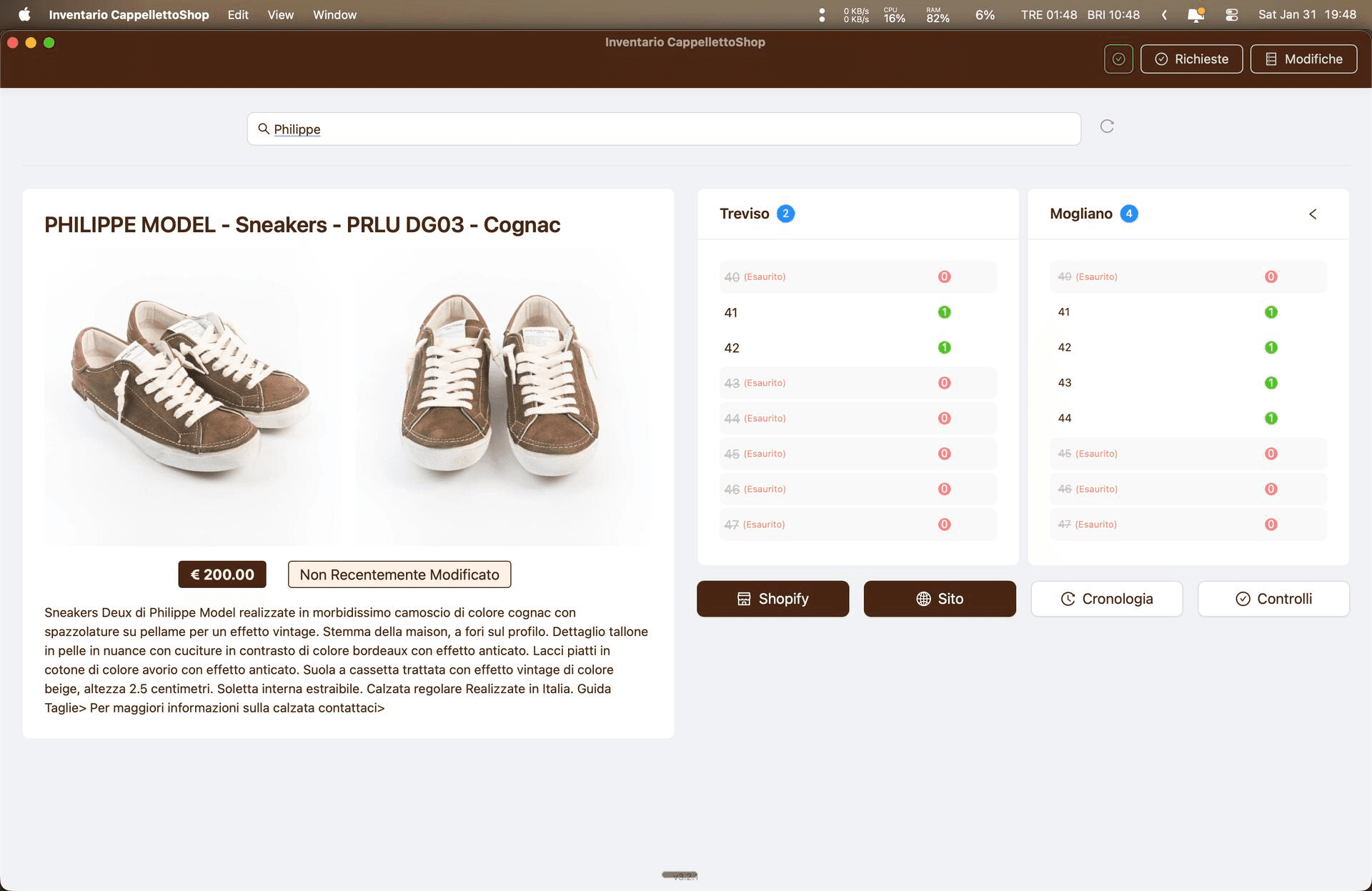
The React and TypeScript interface runs inside Tauri and invokes Rust commands across the IPC boundary. Exact-SKU and title-prefix search use Shopify GraphQL. Selected-product and inventory-level reads, the default one-unit adjustment, and the conditional product-status change use Shopify REST, while FirebaseClient writes the application-owned audit entry through Firestore REST.
Implementation
- Search waits for at least two characters, debounces for 300 ms, queries exact SKU first, and auto-selects an exact or sole result.
- After fetching the product, location inventory loads while product data is processed; primary and secondary quantities are then mapped onto each variant.
- A confirmed decrement resolves the configured primary location and sends available_adjustment: -1 through the logged Rust command.
- After the Shopify write, Rust checks all variants and locations, conditionally attempts status → draft, writes a Rettifica log, and the UI refreshes logs and stock while retaining the undo target.
Failure boundaries
- The decrement is sequential, not atomic: Shopify inventory can change before a later zero check, status update, or Firestore write fails.
- Undo adds one unit back, records Annullamento, and can reactivate a product that was previously at zero.
- A two-location transfer restores the source when the destination adjustment fails, but successful Shopify writes are not rolled back for later logging warnings.
- No matched timing artifact supports the previous package, memory, startup, or search percentages, so those claims are not published here.
Lessons
A short operator flow is only credible when the automated work behind it stays visible. The useful simplification is reduced staff navigation with exact-SKU selection, location hydration, logging, status handling, refresh, and recovery bundled into one inspectable path—not the disappearance of backend work.
Executable architecture
One adjustment. Every boundary visible.
The short staff action sits in front of a longer, sequential execution path. Exact-SKU and title-prefix search use Shopify GraphQL. Selected-product and inventory-level reads, the default inventory adjustment, and the status branch use Shopify REST; the application-owned audit entry uses Firestore REST. Tauri IPC and Rust orchestration connect those boundaries.

Recovery boundaries
Undo is not the same as rollback.
Undo adds one unit back and can reactivate a product that was previously at zero. A two-location transfer has a narrower compensating path: if the destination increment fails, Rust tries to restore the source. Successful Shopify writes are not reversed when a later transfer log produces a warning.

Matched workflow proposal
Fewer staff steps, not less system work.
The custom application bundles exact-SKU lookup, two-location hydration, a one-unit adjustment, audit logging, policy checks, refresh, and an undo affordance behind a compact operator flow. Shopify Admin exposes more of the adjustment and pending-review sequence. No matched timing study is attached, so this comparison makes no speed claim.
Interactive workflow explorer
Walk the human step. Inspect the system work.
Workflow comparison / no timing result
- Start
- Both tools open and authenticated at their inventory entry screen.
- Input
- Known SKU, chosen location, available quantity greater than one.
- Operation
- Decrement exactly one available unit.
- End
- Persisted success or confirmation is visible.
Human action
01 / 04Find the SKU
Scan or type the known SKU.
Automated system work
Custom appWork behind this stage
- Wait for at least two characters and the 300 ms debounce.
- Run the exact-SKU Shopify GraphQL query first.
- On a miss, run the title-prefix GraphQL fallback; auto-select an exact or sole result.
Source / SearchBar.searchProducts
No matched timing study is attached. This explorer compares sourced workflow stages only; it does not claim elapsed-time savings or that either path is universally faster.
Separate operational analysis
Checkout evidence, kept in its own lane.
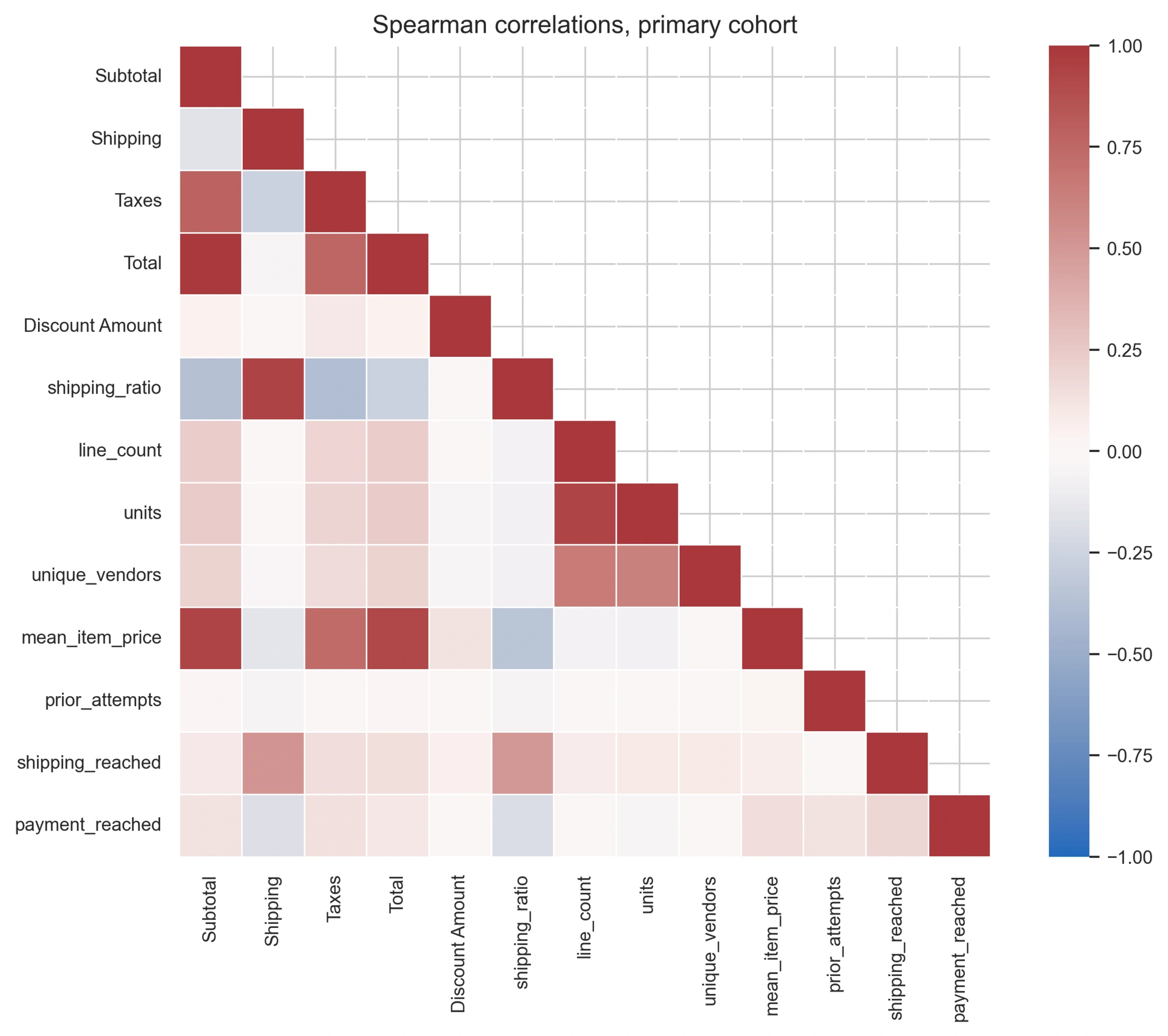
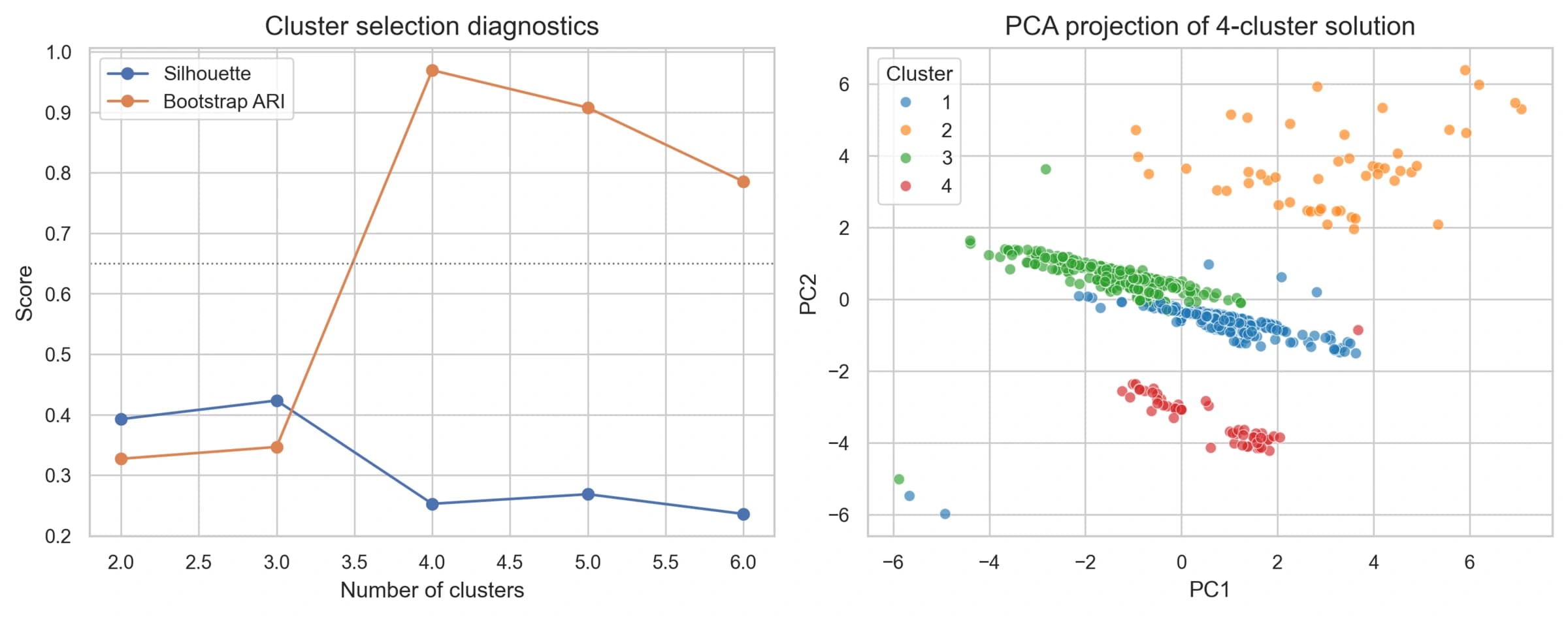
These figures come from a separate abandoned-checkout analysis in the same source repository. They remain useful evidence of analytical work, but they do not describe the desktop inventory execution path and are not measurements of the rebuild.
Checkout-stage analysis
Segmentation diagnostics
Behavior relationships